To 3G or Not to 3G?

With the launch of the new 4G version of the iPad, the initial popularity of the WiFi-only Kindle Fire, and the release of the Windows 8 Consumer Preview I decided to do a test of the viability of living with a WiFi-only tablet versus one equipped with 3G/4G.  I’ve had brief experiences before, such as taking a Kindle Fire with me to lunch and discovering that the restaurant didn’t offer WiFi access.  But yesterday I decided to spend an entire day with 3G turned off on my iPad and see how that impacted my usual usage patterns.

Of course turning off 3G in my home or office is not an issue because I have WiFi in both.  If you are only using your Tablet at home or in the office, you almost certainly don’t need 3G and we’ll ignore that in the following discussion.  I was at home or the office before, between, and after these events.

First stop was a doctor’s appointment in the morning.  I love having my Tablet with me for these because as we all know the wait-time can vary so dramatically.  In the worst case the doctor is delayed by an emergency and you can sit for an hour or more.  Sadly this was to be the first “failure” in my test as the doctor’s office did not provide public WiFi.  Fortunately I was not kept waiting long, so I did not succumb to boredom and re-enable 3G access.

Next up was lunch.  Since I was going to one of the more modern fast casual places I figured they would offer WiFi access, but sadly I was mistaken.  I tried to access a weak signal from a yogurt shop down the block, but couldn’t successfully connect.  Sorry, no reading the New York Times, the blogs I follow, or even checking my mail over lunch.

Later in the afternoon it was time for Physical Therapy.  I got to the office early and decided to sit in my car for a few minutes and check how the stock market did.  Oops, no WiFi hotspot to connect to out there.  Darn, I guess I’ll have to take my iPad into the office with me instead of leaving it in the car.  Well, that was a waste since there is no public WiFi in the office either.

On the way home I decide to stop at the supermarket.  I need to look up a recipe and create my shopping list.  Fortunately Safeway has started to add WiFi hotspots to its stores, and so this is the one time during my day of travels where I don’t need 3G.  But had I gone to my preferred supermarket, rather than the one I happened to be driving by, I wouldn’t have been so lucky.

Yesterday was typical of my usage habits.  When I say mobile I mean mobile.  I use my Tablet everywhere, and that means I want connectivity everywhere.  Publicly accessible WiFi is just not ubiquitous enough to provide that.  Even at-home scenarios don’t fully work with WiFi.  A few weeks ago I was waiting in our barn for a service guy to appear.  For about an hour I sat in the lounge using the Tablet to entertain myself.  There is no Internet, WiFi or otherwise, in the barn.   And so I’ll stick with a Tablet that has 3G (or for anything new, 4G) thank you very much.

Posted in Computer and Internet, Mobile, Telecom | Tagged , , , , | Comments Off on To 3G or Not to 3G?

Hacktivism: Some things never change

Over the last couple of weeks we’ve seen the FBI and international law enforcement groups arrest members of the LulzSec and Anonymous groups for their computer hacking activities.  For the last five years or so these (and other) groups had been launching an accelerating set of attacks on commercial and governmental computer systems.  Since they weren’t doing it for profit, and instead seemed motivated largely by personal political leanings, this was all considered “hacktivism”.  Of course the activities were criminal.  Of course these “super-hackers” used technology to hide themselves from the authorities.  And, in truth, as long as their activities were limited to minor stunts meant to send political messages Law Enforcement wasn’t going to put a lot of resources into stopping them.  But they were so righteous (particularly in their attempts to support WikiLeaks), and thought themselves made so invincible by the anonymity they maintained on the web, that they fell victim to two mistakes.  They accelerated their activities to the point that they woke the sleeping giant.  And they forgot that Law Enforcement has a long history of dealing with “organized crime”.  In the end they were knocked down a couple of notches by classic law enforcement techniques.  More importantly they woke the FBI up to the increasing risk of cybercrime, to the point that a few days ago FBI Director Robert Mueller told RSA Conference attendees that Cybercrime was on its way to eclipsing Terrorism as the greatest threat to the United States.  And that the FBI was organizing to fight Cybercrime using what it had learned in the fight against Terrorism.  Legislation for fighting Cybercrime is also now a hot topic in the U.S. Congress, which should have us all both relieved and terrified at the same time (since generally speaking Law Enforcement has used new powers given to them by Congress to do more than Congress intended, such as apply RICO to non-organized crime activities).

For those who don’t follow the story a very brief summary.  A disaffected member of LulzSec (and Anonymous) figures out who a key leader of LulzSec is and this information gets to the FBI.  The FBI goes after the leader, and apparently offers to keep him out of prison if he helps bring down the group.  The leader cooperates and helps the FBI gather information about group members, their activities, etc.  Eventually the FBI decides it has what it needs and the arrests follow.  Does this sound much different from how the FBI has brought down organized crime groups in the past?  Think “Sammy the Bull” Gravano and the Gambino crime family as a well-known example.

Think back to the late 1960s and early 1970s where anti-war protests spawned leftist activism groups that used civil disobedience which themselves spawned ever more radical groups that were willing to use violence, like the Weather Underground and its bombings of corporate and government buildings (including the U.S. Capitol).  Lulzsec and Anonymous were becoming the Weather Underground and Red Army Faction (aka, Baader-Meinhof Gang) of the Internet age.  That was something Law Enforcement couldn’t ignore.

Some months ago, when LulzSec launched an attack on the CIA, I tweeted about how silly it was to launch a cyber attack on organizations who’ve declared that such attacks could warrant a kinetic response.  I was only half-joking.  Governments, the U.S. included, will use force to stop cyber attacks.  Particularly attacks that put lives at risk.  In this regard perhaps LulzSec and Anonymous members have been lucky that Law Enforcement got to them first.  If a CIA operative were to lose their life as a result of hacking, I’m not sure the CIA’s response would necessarily involve “due process”.   And if hacking resulted in the CIA, FBI, etc. failing to stop a terrorist attack the public would certainly be calling for blood.

Just as Sammy Gravano’s testimony brought down the leadership of the Gambino crime family, but didn’t destroy the family let alone the whole “Cosa Nostra”, the recent waves of arrests will not eliminate cybercrime, hacktivism, or even the Anonymous group (though it probably did end LulzSec itself).    They’ve just made a temporary dent.  But the sleeping giant is awake.  Just as the need to fight organized crime lead to the RICO statutes, Congress is likely to pass laws to make it easier to fight cybercrime.  Just as 9/11 lead the FBI and other government agencies to focus on fighting terrorism, they are now organizing and gearing up to fight cybercrime.  Likewise, just as 9/11 made companies and government organizations hyperaware of the need for better physical security the attacks by LulzSec and Anonymous may finally have shaken them up enough to really focus on cybersecurity.  And not a moment too soon.

In some ways I really want to thank the members of LulzSec and Anonymous for waking up the world to the dangers of Cybercrime and Hacktivism.  A few years back I suffered directly from the result of Hacktivism, as a group broke into the web site of a political candidate they didn’t like, stole credit card information (including mine), and then released it publicly to embarrass the candidate.   Hacktivism has now become a leading cause of Identity Theft and invasion of privacy, which is why the fight against it should matter to even those who support its political goals.   On the other hand I worry about the loss of freedom that might result from fighting Hacktivism.  For example, during the recent legitimate protest activities against the SOPA and PIPA legislation attempts were made to discredit protesters by suggesting a link with the hacking activities of Anonymous.  Will new legislation and zealous law enforcement cross what are often fine lines between legitimate and unacceptable activities?  No doubt.  And that’s something we’ll all have to be on guard for.

Have we entered a new era in the fight against Cybercrime, and its Hacktivism guise?  I think so.  The next few years are likely to be exciting and (hopefully just electronically) bloody.  Or maybe we’ll all get lulled back into a false sense of security until a cyber-9/11 occurs.  But with any luck we can combine an active fight against Cybercriminals and Hacktivists with the continued march towards systems that are significantly harder to hack to relegate this problem to “just” another part of society’s darker side.   Sadly that is the best we can hope for.

Posted in Computer and Internet, Security | Tagged , , , | Comments Off on Hacktivism: Some things never change

Can you use multiple “windows” with Windows 8?

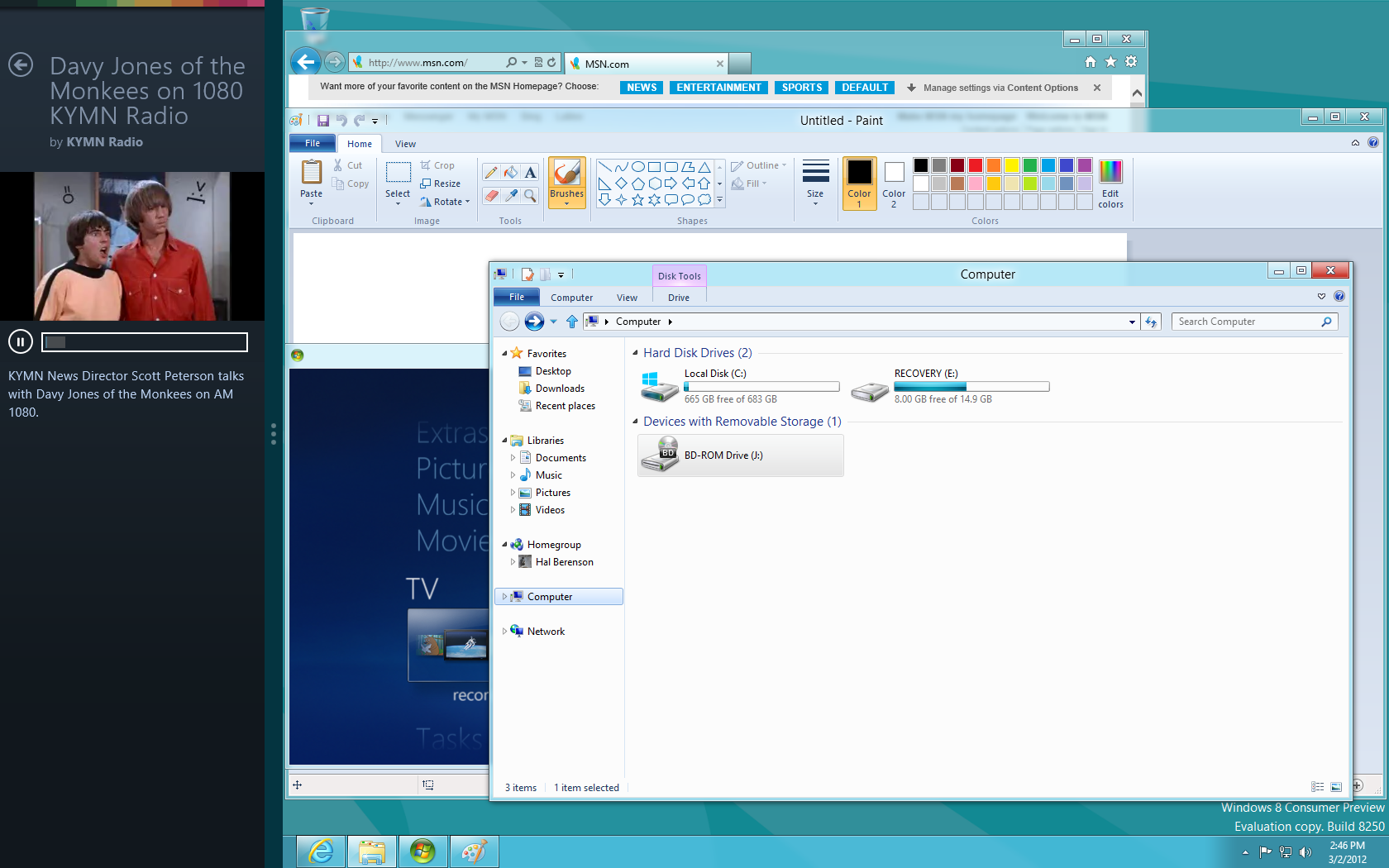
Of course you can, particularly with the Desktop.  Yes when you live primarily in the Desktop then the Start Screen is more jarring then the Start Menu was.  I would likely pin more things to the Task Bar or put my shortcuts on the desktop to reduce the use of the Start Screen in this environment.  But hey, take a look:

Windows 8 Desktop

And of course you can run a Metro app and the desktop at the same time too:

Windows 8 Desktop while playing a Metro Vimeo video

As I learn new little tricks, for example right-click in the lower left corner of the desktop makes some frequent power-user tasks more accessible, Desktop-style use gets more acceptable.  I’m still not comfortable with Windows 8 on a traditional desktop PC, but I only have a couple of hours doing so with the Consumer Preview.  Will I hate, tolerate, like, or love it?  Only time will tell.

Posted in Computer and Internet, Microsoft, Windows | Tagged , | 14 Comments

Unlimited Data Plans: A reality check

AT&T has really been pissing me off lately with their attitude towards unlimited data plans.  Look, if you don’t want to respect your original definition of “unlimited” then stop screwing around and just eliminate the plans.  Nothing could be worse than screwing your most loyal customers, first with an opaque throttling definition and now with a transparent definition that leaves your best customers being more poorly served than new customers paying the same price.  AT&T grandfathered in Unlimited Data customers to keep them happy, but its treatment of those customers has more than ruined any good will from the grandfathering.  Strike One and Two against AT&T.

Of course AT&T is compounding its mistreatment of loyal customers by raising the upgrade fee for new devices when you come off contract.  Now let’s see, I can’t really keep my unlimited data plan and it costs me more to get a new phone and stay with AT&T then to go to Verizon?  Essentially AT&T has put the question of which carrier I, and millions of other customers, will be on the next time we buy a phone.  Pretty dumb given that, other than occasional frustration with coverage, I am a pretty happy AT&T customer and have been for about 8 years.  Strike 3?

Now for some reality checks.

I checked my smartphone data usage for the last year and in no month did I exceed 500MB.  So on the surface I really have no reason to maintain an “unlimited” data plan and if I do I’m in no danger of being throttled.  Part of this is that I frequently carry a tablet with me that has its own 3G data plan, so a change in usage habits could drive my smartphone data usage up.  But would it go up from 500MB to over 3GB?  Doubtful.

There are three other factors that likely will keep me with AT&T even though I’m annoyed with them:

First, no other U.S. carrier has a decent selection of Windows Phone devices.  Verizon and Sprint are mostly ignoring the platform, though that might change this fall.  T-Mobile is focused on the low-end of the market.  Only AT&T has the high-end devices from the top 3 Windows Phone manufacturers, Nokia, Samsung, and HTC.

Second, we do not have great coverage at our house from any of the carriers and AT&T gave us a free Microcell.  So our AT&T coverage at home is effectively quite good now and I can give out my cell number with confidence I can be reached.  With another carrier we’d have to find a way to address this, possibly by purchasing a Microcell if that carrier offered one.  But it is both an issue and a cost that would need to be addressed in any switch.

Third, I do enough international travel that I favor staying with a GSM carrier such as AT&T or T-Mobile over CDMA carriers Verizon and Sprint.  In other words, not only would Verizon and Sprint need better Windows Phone offerings to capture my attention, they’d have to be Global (dual CDMA/GSM) phones.

So while I think AT&T’s treatment of its loyal customers is just awful, and I sometimes envy the better coverage my Verizon-toting friends have, there are more reasons for me to stick with AT&T than to leave.    That’s the reality.

Now I do have one device where AT&T’s policies leave me confused.  My iPad also has an unlimited data plan.  I’ve seen nothing out of AT&T that indicates what happens when an iPad user exceeds the old 5% mark or the new 3GB mark in data usage.  There are months where I’ve exceeded the 1.5-2GB that some where reporting caused AT&T to throttle their Smartphone unlimited data plan usage.  But I’ve never been notified I was in the 5% and never noticed any throttling.  Moreover, since my next tablet is likely to be a Windows 8 tablet and the iPad data plans won’t carry over to that, and my other reasons for sticking with AT&T mostly don’t apply, I’m open to a carrier switch for the new device.  I know you are asking about my international roaming problem, and the truth is that there pretty much isn’t international 4G data roaming.  So I’m likely to focus on the best domestic 4G offering for a new tablet and just rely on WiFi when traveling internationally.

Bottom Line: AT&T is making it hard to stay a customer, but as each individual re-evaluates their carrier choice most may end up sticking with them.  Still, customers will remember how badly AT&T screwed them.  And when circumstances change they’ll dump AT&T out of principle.


Posted in Mobile | Tagged , , , | 9 Comments

Can Windows 8’s Metro succeed on the desktop?

The biggest cloud hanging over Windows 8 is how desktop (and notebook) users will react to the new Metro user experience (which I’ll refer to as MoSh to differentiate the new “Modern Shell” from the app model and Store change).  What we’ve seen in the Developer Preview, hints of later builds, and descriptions from Microsoft has already caused a lot of discussion.  In a few days we’ll see the Consumer Preview, with its updated and near final implementation of MoSh.  The Consumer Preview is likely to be downloaded, and used on a daily basis, by millions of people.  The demographics of Consumer Preview users will lean heavily towards Power Users, meaning that those least likely to be happy about MoSh will be the ones putting it under a microscope.  These are also the key influencers, so while we can expect they’ll be more negative than the general PC user population their views can’t be dismissed because they will heavily influence Windows 8 adoption.  If they are too negative overall then Windows 8 is in trouble.  Some will be (and already are) very vocally opposed to MoSh, but we don’t yet know if that is a small minority, substantial minority, or majority.  Over the next few weeks we’ll find out.

I’m cautiously optimistic about MoSh’s chances.  Before moving on to explain why I should acknowledge that what I say here may have some conflicts with my “Devil’s Advocate” piece aimed at developers.  In that piece I picked a specific example of where Tablets come into the picture, and I time-compressed the reactions of the IT hierarchy to many of the changes being introduced with Windows 8, to make a point.  Now I’m back to discussing short to mid-term reality.

Let me explain my own usage pattern of Windows.  Going back to Windows 3.1, the first version I used regularly, I’ve had the same usage pattern.  I always maximize the window I’m working on to take up the full screen.  10″, 15″, 20″, 23″ or larger monitors make no difference.  Alt-Tab is my best friend as I rapidly switch back and forth between windows.  Sometimes I need two windows on the screen so I can reference one while typing in another, but I hate when they overlap and I have to continually move things around so information I need is not occluded.  So my norm is 1-2 non-overlapping windows.  When I’m doing software development my pattern changes a bit.  Then I like having more than one monitor so I can keep the window I’m concentrating on open on one and use another to keep a few smaller, non-overlapping if possible, windows open as well.

The co-founder of my old SaaS startup likes to chide me about my lack of desire for monitors much bigger than 20″ (although I’ve recently grown quite fond of a 23″ monitor) because his usage pattern is quite different from mine.  He likes huge monitors, and the more of them the merrier, so he can have as many windows up on them at the same time as possible.  One of my observations though was how much time he had to spend moving windows around on his monitor(s).  To me it seemed like the more real-estate you gave him the more time he wasted managing it.

So there you have two people, who have been working together off and on since the 1970s, who represent two ends of the spectrum on how they use Windows’ windows.  One question is, whose usage is more representative of the general population of Windows’ users?  Certainly if you walk around a software developement shop I think my co-founder’s usage pattern in more common than mine, but what if you walk around the more general user population?

Let me throw out some anecdotal evidence.  I go to my Insurance Agent’s office and observe both his, and his employees’ computer usage.  In every case they have the app they are using in full screen mode and switch to other full screen apps as they need them.  I go to my Dentist and Doctor and observe both the back office and medical personnel using that access pattern.  I walk into retail stores and observe the sales people and how they use their PC and it is that full screen/app switching style.  I hear call center personnel talking to themselves as they work on their PC and you can tell they are looking at one app at a time.  I glance over the shoulder at travelers on airplanes and see a single application taking up the entire screen of their notebook .  I watch my wife and she mostly works on a single app at a time.  Anecdotally, I see few users who make regular use of Windows ability to display large numbers of windows on the screen at once.  Even when I see people using multiple windows, such as those who need a lot of information being displayed at the same time (e.g., security traders) they are using non-overlappingwindows.  Of course this is anecdotal data, and a very narrow slice at that, but the data Microsoft collects through its Customer Experience Improvement Program (CEIP) telemetry is extensive and gives them a good picture into actual usage patterns.  If it matches my anecdotal data then a design that optimizes for having a very small number of non-overlapping windows makes sense.

How about the Start Screen vs Start Menu controversy?  In the Building Windows 8 blog Microsoft talked a lot about how their telemetry suggests that the new Start Screen approach is far superior to the Start Menu for most users.   What about anecdotal data?  Let’s start with one of Windows’ user experience failures.    When Windows XP shipped it was stripped of all desktop icons except for the recycle bin.  The recommendation (and guidance to software developers) was to not use desktop shortcuts, but rather to just use the Start Menu for all application access.  And the first thing nearly every user did was ignore Microsoft and create desktop shortcuts for all the applications they regularly accessed.  Software developers briefly made the default installation not put a shortcut on the desktop, but most reversed that decision on future updates.  Look at many users’ (Windows XP, Vista, or 7) desktops today and they look a lot like the Windows 8 Start Screen!  Now personally that is not my access pattern.  I generally run applications I’ve pinned to the task bar or by hitting Start and typing to cause a search for the app.  It is rare for me to actually walk the Start Menu hierarchy.  Now my pattern might be reflective of Windows 7 users, but obviously isn’t reflective of Windows XP users (who have neither feature).  The sprinkle lots of shortcuts on your desktop pattern is extremely common all the way back to Windows 95.    And so for most users it seems that MoSh’s Start Screen actually is an acknowledgement of their actual usage pattern.  Having search so well-integrated means that my usage pattern should adapt to it quite readily as well.  Moreover, after a few years of iPhone, iPad, and Windows Phone usage the Start Screen paradigm may be very comfortable for me.

The anecdotal evidence and hard data seem to support the choices Microsoft made in designing MoSh.  But is that enough to insure that the Windows 8 user experience is well accepted by desktop/notebook users?  Hardly.  There are two problems.  First, while you can optimize for the 70%, 80%, 90%, or even 98% of users that may leave the other 30%, 20%, 10%, or 2% terribly dissatisfied.  Not only might you lose those users, they could end up “poisoning the well” so that even users who should be thrilled by the new user experience won’t give it a chance.  I know, for example, that if I tell friends and family that I don’t like Windows 8 I can cause at least a dozen people to stick with Windows 7 or abandon Windows for the Mac.  And that’s not even getting into the thousands who might be influenced by my blog entries.  Second, even though you create something new that you objectively know should thrill the majority of users, change is hard and those users might reject change.

The jury hasn’t even heard all the evidence on Windows 8’s new user experience yet, so figuring out if it can succeed or not is difficult.  As I’ve said, I’m cautiously optimistic.  But it could fall flat on its face.  Over the next few weeks we’ll get our first true look at how users feel about the new user experience.  I’m sure many people at Microsoft are holding their breath.

Posted in Computer and Internet, Microsoft, Windows | Tagged , , , | 36 Comments

Untangling Tango

There have been a couple of rumors recently that I wanted to comment on. The first is the confusing signals about Windows Phone Tango. The one that had me head-scratching was that Tango would co-exist with Windows Phone 8. That might be true, but when I think through some of the other rumors around both versions I come to a different conclusion. The main thing Tango will introduce is a new “Starter Edition” that not only is targeted at lower end hardware, it has reduced functionality so Microsoft can charge OEMs less for it. Then as Microsoft releases newer versions, such as WP8, those versions will continue to come in a Starter Edition as well as the full product.

The second is a comment that Microsoft hadn’t yet decided on using the Windows 8 core in Windows Phone. I believe they have, but there is a Plan B. Windows Phone 8 has to ship earlier than Windows 8 because of the longer mobile (carrier trial) cycle. So if Windows 8 itself doesn’t stabilize in time the Windows Phone team has kept their code base working on Windows CE as a backup strategy and will ship that. But this indecision can’t last much longer.

Hopefully this will all be clearer after MWC.

Posted in Computer and Internet, Microsoft, Mobile, Windows Phone | Tagged , , , | 8 Comments

Why a locked down Metro/WinRT model makes such a big difference to security

Secunia is reporting that 78% of end-point (individual computers for all those not in the security business) vulnerabilities are attributable to third-party software.  That’s everything from browser plug-ins like Flash and Java, to Adobe Reader, to Quicken or any other desktop application you install.  While it would be foolish to believe that a pure Windows 8 Metro environment, including disallowing browser plug-ins, can eliminate all vulnerabilities it can eliminate much of that 78%.  Add on other security changes in Windows 8 that help reduce or mitigate the remaining 22% and you can see how Windows 8 Metro is a game changer for PC security.

On the other hand, in a Windows 8 environment that includes browser plug-ins and multiple third-party desktop applications the best Microsoft can do is attack the 22%.  The 78% that Adobe, Oracle, and everyone else is responsible for will remain an issue.

“Ask not why you must use a constrained app model for your apps, Ask why I should put my personal or organizational security at risk by installing your desktop application.”

Posted in Computer and Internet, Microsoft, Security, Windows | Tagged , , , , | 3 Comments

Dear Developer, excuse me while I slap you silly

Today I’m going to abandon my usual balanced friendly analysis approach and play devil’s advocate, because I think there is an audience that needs a wakeup call.    No it’s not developers of consumer apps, I think they’ve already gotten it.  They realize the consumer is in charge and that if they like what you create they’ll fork over a buck or two, accept advertising, or use the app to front-end the service that you are really trying to monetize.  And if they don’t like it, well then there are always at least ten other developers offering a competing app.  No, this is for developers of business applications.  You haven’t yet figured out that you aren’t in charge.  Your masters like to let you think you have real power because it’s easier than enduring the pain when you revolt, but they hold the real power.  And most importantly the purse strings.  And their needs and your wants are diverging.

You can whine all you want about Tablets being only (and barely suitable) for consumers, but when the VP of Retail decides she’s handing all 10,000 store associates Tablets you are going to be writing Tablet apps.  I don’t care if you are working in IT, or for a retail system software supplier, you will write Tablet apps or be out looking for a job.  You will try to use FUD (Fear, Uncertainty, and Doubt) to get them to let you keep using classic Windows desktop  technologies, and perhaps at first you will strike sufficient fear into their hearts that you can win.  But mostly that approach will fail.  The retail associates will rebel against anything that reeks of legacy, and wonder why they can’t have as good an experience as they have on their consumer Tablets.  Business Unit management will look at their competitors, perhaps already using iPads for the same purpose, grow a pair, and let you know in no uncertain terms that their priority is on the optimal modern Tablet experience.  iPads will be one option, Windows 8 Tablets will be another.  But Windows 8 Tablets running Windows Desktop apps will be a non-starter.  If the choice is Windows 8 then the preferred experience will be a pure Metro one.

The VP of IT Operations will look out upon the available Tablet options and his organization’s capabilities for managing them.  He will look at how well they can enforce corporate policies, prevent data loss, centrally control the remote Tablets, tie these systems into their corporate identity systems, and meet audit and monitoring requirements.  He will conclude they can do an OK job for iPads and a great job for Windows 8 Tablets.  Operations is no more in charge than you developers are, but they are much better at FUD.  Developers can walk out the door, but bad operations can put a company on the front page of the Wall Street Journal and the CEO in front of a jury.  They will prefer Windows 8 Tablets, perhaps overwhelmingly.

Your CISO (Chief Information Security Officer) will look at Windows 8 and drool.  They will see things like Secure Boot, the use of Reputation when deciding what applications to allow to run, the smoother more transparent patching process, and other basic security improvements and wish they could immediately force the company to upgrade its entire base of PCs.   Then he’ll look at the Metro environment and how it solves their problem of keeping unsafe applications off of PCs.  He’ll establish policies that require new applications purchased or written for Windows 8 systems be Metro apps.  Anyone who wants to create or purchase new Desktop Apps will need policy exceptions from the CISO and the Chief Risk Officer (CRO).  He’ll also establish policies that favor Windows 8 Tablets over iPads, again establishing an exception process.

The purchasing department will look over the Tablet landscape and the business unit requirements and try to find the lowest priced Tablet that meets those requirements.  Those Tablets will have configurations that work great for Metro apps, but are taxed by heavy use of desktop applications.  They will report that configurations capable of being used primarily for desktop applications, while still meeting requirements for things like battery life and low weight, are far more expensive (or unavailable).

The VP of Retail will look at all this data and decide it would be a crazy waste of her time to convince the VP of IT Operations, CISO, and CRO for policy exceptions and the CFO to approve the more expensive project.  To what end?  To make a few developers happy?  She doesn’t give a damn about developers and is tired of them being the bottleneck to her meeting business goals.  What she cares about is the productivity of Associates, and the improved experience of customers, in her Retail Stores.   And she is convinced that Tablets and a touch-based UI (even on non-tablets in the store) is the best approach.  She will insist on Metro apps on Windows 8 Tablets as the basis of her project as the path of least resistance for achieving her business objectives.

Oh, you developers will go nuts.  You’ll find legacy projects within your own organizations where you can hide and use old technologies rather than wanting to work on new things in technologies you don’t care for.  Or you’ll quit your job to move to a company that hasn’t adopted these technologies yet.  I have had many a friend and colleague followed this path on previous transitions.  One of two things happens.  They find they can’t hide from the technology transition forever and eventually, and unhappily, make it themselves.  Or they give up on their career growth and happily hide away in legacy niches for decades, milking money out of the demands on a shrinking expertise pool.  I have one friend who quite literally left $ Millions on the table because he couldn’t bring himself to move off a beloved but legacy technology in order to take a new job.  Or ask the pool of Cobol developers who had one last great hurrah fixing old apps for Y2K, and then found themselves on the unemployment line.

You developers like to think you hold all the cards when in truth you are the tail trying to wag the dog.  They throw you bones to keep you happy, but when push comes to shove you’ve got a weak hand.  And the market trends, the ones that those of you who focus on businesses  try to dismiss as being “only ok for consumers”, show an explosion in Tablet adoption, new user interface technology adoption, and an overall consumerization of IT going on across the business spectrum.  This “consumerization of IT” thing has been the trend for about five years.  Consumers increasingly reject the old experiences in both their person and work lives.  For the 20-something and under crowd the current Windows desktop experience is about as attractive as the thought of visiting a 19th century dentist.  It isn’t a fad, as many business app developers are praying for.  There is no “Ah Ha” moment that will cause the world to abandon these trends and return to a world of cascading menus and mice.

And guess what folks, if Windows 8 and Metro fail the world you will be left in is not a Windows Desktop world.  Even if Microsoft does offer a fallback to the classic desktop, that will be the OS/360 of the client world.  It will be an IOS, or IOS-like, enterprise computing world.  That VP of Retail isn’t going to abandon her project to give Tablets to Retail Associates.  And neither is the VP of Manufacturing going to give up touch-based UI for shop floor use nor Tablets for those workers needing portability.  Nor the VP of Sales for his reps.   They’ll just go with iPads, or maybe Android Tablets.  And as Apple gains more and more traction with Tablets and Smartphones in the Enterprise, so will Macs.  Especially as Apple unifies IOS and Mac OS.  How long do you really think it is before Apple puts the IOS UI (if not all of IOS) on the Mac and offers Macs that are completely locked to the App Store?

What are the other alternatives?  Chrome OS?  Oh, what are you going to program that in?  It’s a web model, not a local native app model.  Android?  It’s Java/Dalvik and tuned for touch just like Metro and IOS.   I’m not dissing these two (at least not in this context), just pointing out that they don’t really offer a place to run if your goal is to retain the classic totally open, totally general purpose, desktop computing environment that so many feel is an absolute necessity.   That leaves you raw Linux.  And while the powers that be are fine with the use of Linux on servers, they’ve shown no inclination to adopt it on clients.  And frankly speaking, the Linux community (other than as Android’s underpinnings) has shot off so many toes trying to address client use that these days they keep growing more toes apparently so they have more to shoot off.  I’ve given up on any hope that Desktop Linux will ever be more than a geek-toy.  At best you’ll be able to use a Desktop Linux system personally, but all your app development will be for a touch-centric, locked down ecosystem, client device.

So that’s it folks.  The end-user, and “the man” are going to demand Tablets, and Tablet-like natural UIs, and the benefits of the locked down ecosystems, and in the Windows world they are going to demand Metro.  And those developers who resist will learn their true place in the hierarchy.  And it’s not at the top.

Now, let the outrage begin.

Posted in Computer and Internet, Microsoft, Windows | Tagged , , , , , | 76 Comments

Silverlight is dead, long live XAML

Although I’ve half-written blog entries on this before, I’ve scrapped them because at the time I would have been speaking out of turn.  Then I thought Microsoft had said enough that everyone got it and a blog entry would be pointless.  But today someone I respect said that enterprise customers were still confused about Silverlight, so here is my take on the situation.

Keeping this brief, Microsoft took the presentation technology it had developed for Windows  Vista called the Windows Presentation Foundation and created a portable multi-platform/multi-browser application framework called WPF/E (for Everywhere).  When it was formally launched WPF/E was renamed Silverlight, and Microsoft proceeded to market it as an alternative to Adobe Flash for Rich Internet Applications.  Besides the strong support for video, which HTML lacked, Silverlight made it easier to target multiple browsers than trying to do so with HTML because the browsers had fragmented in their support for HTML (and yes I realize that Internet Explorer was a primary offender).  Along comes HTML5 with its Video tag and a commitment from all the major browsers, including IE, to conform to the standard and 90% of the justification for both Silverlight and Flash is gone.  Yes there are some scenarios where Silverlight is likely better than HTML5 Video for now, but it is a niche market.  Especially since the trend in mobile devices, particularly the iPhone, iPad, Windows Phone, and Metro browser in Windows 8 don’t support plug-ins (such as Silverlight or Flash).  So Silverlight the multi-platform/multi-browser application framework is DEAD.  Of course Microsoft doesn’t use that word because it is still available, supported, etc. and in fact they only recently released Silverlight 5.  But strategically a Microsoft-proprietary multi-platform/multi-browser application framework makes no sense and they won’t move forward with it.

On the other hand, the Silverlight code base is doing just fine.  At least I think it is.  In Windows 8 they just call it XAML, but I have reason to believe that it is actually the Silverlight code base.  That’s what “we” should have called it for Windows Phone 7 as well, and the Windows Phone team did not want to call it Silverlight specifically because of the multi-platform/multi-browser association.  But Silverlight was in its ascendency at the time, Visual Studio and Expression Studio were late in their development cycles and had little runway for change, and we (DevDiv) did not want to further fragment (beyond WPF and Silverlight) the XAML world.  Plus with Silverlight being “hot” and Windows Phone having no traction we felt that using the name Silverlight for the XAML support in Windows Phone would be a net positive (even though it causes confusion).    So we won the argument and Windows Phone uses both the Silverlight code base and name.  It probably did help that first year, but at this point it just adds to the confusion.  For Windows 8, with no desire or benefit of associating with the Silverlight strategy, it makes perfect sense not to call its XAML support Silverlight.  And it wouldn’t surprise me if Windows Phone 8 drops the Silverlight naming in favor of just calling it XAML as well.

So the bottom line for Enterprises is this:  XAML is alive and well, but the Silverlight browser-plugin is pure legacy.  The latter, like Flash, should be replaced with HTML5/Javascript as soon as practical.  And if Microsoft disagrees with that assessment then they should come out with a crystal clear statement of what they think Silverlight’s future is.  Because apparently the customer base is still confused.

Posted in Computer and Internet, Microsoft | Tagged , , , , | 21 Comments

Windows 8 is not all about Tablets, it’s about the future

What we know about Windows 8, mostly driven by the Developer Preview but also by various comments from Microsoft, is quite polarizing.  The most controversial aspects are around the move to the new Metro app model and user experience.  Many Desktop/Laptop users, primarily the kind of power users who would try out the Developer Preview, feel that Microsoft is forcing them into a world that was designed specifically to fight the Tablet war with Apple’s iPad.  They are wrong, and I’m going to explain why.  Before I begin I’m going to state that I don’t think I’m revealing anything Microsoft hasn’t already let out of the bag or is obvious from market data.  I’m doing color commentary and tieing together disparate comments made over the course of more than a decade to paint the full picture.

Nearly all the major technical decisions in Windows 8 were made before the iPad was introduced.  The new app model (WinRT et al): before.  The new user interface (MoSH): before.  Focus on power and other fundamentals: before.  Support for SoC, including ARM: before.  I’m going to go through each of these and give some history and rationale, but before I do let’s have a little candid discussion about the state of the Windows PC business.

Windows Vista reached General Availability in January 2007, the last release of Windows to assume that most consumers and businesses would rapidly replace their existing PCs with newer more powerful ones.  That turned out to be one of the many bad decisions made around Vista, which ran particularly poorly on the installed base of systems.  PC buying patterns were changing, with customers keeping PCs for many years since there were few compelling apps requiring more powerful PCs.  Later in 2007 Netbooks (and later Nettops) were introduced, initially running Linux, with the idea that most PC usage was for web browsing and thus low-cost devices with minimal memory and disk were sufficient for many scenarios.  Microsoft responded by offering OEMs a lower priced edition of Windows XP, which became the most popular operating system on Netbooks.  Windows 7 Starter Edition later took over this niche.  Besides Netbooks, the price of traditional desktop and notebook PCs was also declining under intense competition.  In response OEMs reversed the trend of increasingly packaging higher-end Windows editions and started to package lower end editions (e.g., today PCs intended for small business use tend to come with Windows Home Premium rather than the more appropriate Windows Professional).  The net impact of these changes was that the Average Selling Price of Windows would decline more than could be made up by growth in unit volumes.  In other words, the Windows PC business more or less peaked.  Also in January of 2007 Apple announced the iPhone, launching the Consumer Smartphone business.  In July of 2008 Apple launched the AppStore, turning the iPhone into a personal computing device and giving consumers yet another reason to put off replacing their old PC.  By then Microsoft was busy developiong Windows 7 with an eye towards shoring up the PC market in light of Windows Vista’s failure.  Windows 7 was an excellent release, but did little to expand the Windows business opportunity.  If one were to let the course of events continue, then the best one could hope for was a stagnant business tied to the slowing PC replacement cycle.

Microsoft Research had done a lot of work on Natural UI, including Touch, and brought the Microsoft Surface to market in 2007.  Well before 2007 OEMs had been pressuring Microsoft for more Touch support, not because they wanted to introduce Tablets but because they saw touch-enabled screens on Desktop PCs as being an attractive way to kick-up PC volumes (both as a reason for additional PCs in the home and as a way to speed up the replacement cycle).  HP did a lot of custom work to bring the TouchSmart to market with Vista in January 2007.  Other OEMs have waited for Microsoft to fully embrace Touch, and I know of at least one that was extremely frustrated (back in 2007!) that Microsoft didn’t make this a priority.  Windows 7 improved the underlying support for Touch so that OEMs could more easily roll their own user experience and apps could incorporate multi-touch, but it did little to modernize the Windows user experience for touch-enabled devices.  Windows 7 also has support for other natural UI capabilities, like speech recognition (introduced in Vista), but again the basic user experience hadn’t changed to make that capability more useful.

As Windows 7 development was wrapping up the Windows team began serious discussions about Windows 8.  Steven Sinofsky talks about it as a “re-imagining”.  One of those discussions was around modernizing the user interface.  For a few years the corporate technical strategy had called out Natural UI as a key direction for the company, OEMs were clamoring for it, there was excitement around Microsoft’s niche Surface product, and the iPhone had proven that multi-touch was an attractive paradigm for use in a high volume general purpose product.  And so many months before the iPad was announced, the Windows team was discussing a Modern Shell (MoSh) to replace the user interface whose origins dated back to Windows 95.  One of the requirements for MoSh was that it had to take Natural UI, and particularly Touch, into account.  I have no idea how much the Windows team was talking internally about Tablets at that point.  Personally I believe they were still dismissive of them, as many external analysts were (even after the iPad launch).  But the key point I’m making is that MoSh wasn’t being driven by Tablets, it was being driven by the need to modernize the Windows user experience for Desktops and Notebooks!  And yes those would have keyboards and mice, and increasingly they’d also have touch screens, and microphones, and other Natural UI capabilities (e.g., there is evidence that some PCs will have built in Kinect hardware).  Today we know MoSh as Windows 8’s Metro user experience.   History shows that Microsoft isn’t out to sacrifice the desktop and notebook user experience to pursue the tablet market, they are trying to bring Windows user experience for desktops and notebooks into the 21st century.

Let’s step into another part of the “Windows 8 is just for tablets” controversy, the Windows Runtime (WinRT).  Microsoft recognized it had a problem with the Windows application model at least as far back as the late 90s and started to look for ways to fix it.  Although there were some modest fixes made (e.g., Windows XP introduced side-by-side support to reduce the DLL Hell problem) there was general recognition that you couldn’t fix the app model without completely breaking it.  For Longhorn it was decided to introduce .NET as the new application model for Windows.  Unfortunately .NET 1.0 hadn’t been designed with this in mind, and the attempt to prematurely make it the app model for Windows failed.  This was a primary reason for the “Longhorn Reset”, which removed both .NET and anything that had depended on it (e.g., WinFS) from what became Vista.  Vista did not introduce a new app model, and then Windows 7 was so focused on fixing the existing Windows product that it left introducing a new app model for the future.  However, throughout Windows 7 development the Windows team continued to discuss a new app model.  Late in the cycle, when the re-imagining process began, the decision on a new app model was again on the table.  However much had changed since Longhorn.  On one hand .NET was more mature, but on the other the single largest community of developers in the industry was programming in HTML and Javascript.  Not only that, but managed code (be it .NET or Sun/Oracle Java), hadn’t completely taken over the world and native C++ usage was still high.  And so Microsoft settled on a new app model that was itself fully native to the platform (rather than a layer on top of Win32, as .NET in Longhorn would have been), supported all three programming styles (.NET, HTML5/Javascript, and native mode C++), used modern packaging and install/uninstall techniques, etc.  Again, this change dates back to the 90s and recognition of all the issues with Windows’ app model.  When you look at the intent of the new app model it is to address problems like security and system stability in Windows overall, not a need to introduce something different for Tablets.  And most of the key decisions were made before the iPad was introduced and before Microsoft itself developed a renewed interest in tablets.

What about ARM support?  People will recall that Microsoft’s interest in ARM support dates back to Longhorn and a project called LongARM.  ARM processors, particularly the DEC (later Intel) StrongARM had become the primary processor for Microsofts Pocket PC and Windows Mobile efforts (using the underlying Windows CE operating system).  ARM clearly offered a path to lower cost higher battery life personal computers, and Intel’s failure to adequately respond likely made Microsoft feel it had to add ARM support.  And of course Microsoft also had a long term strategic interest in using the mainstream Windows kernel on phones, where ARM had become the predominant processor.  And so ARM support was reintroduced as part of the re-imagining of Windows.  Now was this purely a Tablet play?  No, recall that Netbook manufacturers were introducing ARM-based Netbooks making this a general purpose PC play.  But with the complete collapse of the Netbook market ARM support now appears to be purely a Tablet/Smartphone play (at least for now).

And so the interesting thing is that all three initiatives within Windows 8 that make people think it is focused primarily on Tablets predate the introduction of the iPad, and were focused on revitalizing the traditional Desktop and Notebook PC market!  Now as the Windows 8 project progressed the iPad did come on the market and prove that Tablets had a place, and a very substantial one at that, in the personal computing market.  That meant they were both a threat to the Windows business and an opportunity.  Fast growth of Tablet sales means that Microsoft has an opportunity to get Windows back on a decent growth path by jumping on that bandwagon.  So I do think that as the Windows 8 project has progressed plans have been tweaked to focus them a bit more on making sure they nail the Tablet scenarios.   But overall the goals of the new user interface, the app model, and even ARM support are to modernize Windows for the entire spectrum of PCs, hopefully driving a faster replacement cycle (particularly for consumers), as well as capturing fast growth in newer form factors such as Tablets.

Now there are scenarios for which Microsoft chose not to make changes in Windows 8.  For example, the new app model does not yet offer background processing suitable for long running computations.  They’ve left that to the Win32 world (on x86 processors) for now.  But no doubt WinRT will add support for long-running background processing tasks in a future release.  That, for example is the kind of tradeoff Microsoft made as it focused the release a bit more heavily on Tablets and other consumption-oriented PCs.  But overall don’t think of the new app model as Tablet specific, it is Release 1.0 of Windows long term app model that will eventually be applicable to all scenarios Windows addresses.

How about the real controversy, the complete switch to MoSh rather than allowing desktop and notebook users to opt for a traditional cascading start menu experience?  Well, we still don’t know (although it is looking unlikely) if Microsoft is actually going to allow this in some high-end Enterprise edition.  I think that what has happened is that as Microsoft gained experience with MoSh it decided to go all in and move the entire community to the modern experience.  This is not unlike what happened with the Ribbon in Microsoft Office 2007.  And while that too caused an amazing amount of controversy, and frustration with the re-learning long-time Office users had to go through, it has proven a very beneficial move.  The Office business is quite strong, somewhat of a surprise given the weakness in the underlying PC business it depends on.  Yes this may slow adoption of Windows 8 in the desktop and notebook markets, particularly for enterprise use.  But as I and many others have noted enterprise adoption of Windows 8 for desktops and notebooks was always likely to be tepid as a result of enterprises just now completing their deployments of Windows 7.  A forced move to MoSh likely doesn’t alter that dynamic much.  And it will cause consternation to those who like the classic Windows user experience and just wish Microsoft would tweak it a little.  But then there are still people who aren’t fans of GUI and operate in command line mode as much as possible.  You can’t please everyone, and in the end the faster Microsoft moves people to the modern experience the better your long term prospects.

So Windows 8 isn’t about Tablets, it’s about modernizing Windows and reinvigorating the Windows business overall.  Most of the work in Windows 8 benefits the entire user base, independent of the new user experience, app model, or ARM support.  And all three of those are meant to make and keep Windows relevant across the entire personal computing space in the years and decades to come.  The way I think people should interpret Windows 8 is that the Windows business was at the precipice, about to start a prolonged decline.  Microsoft decided it was time to go big or go home.  They are going big.  They could still fail of course, particularly if the grumbling about MoSh turns into broad rejection by customers.  But at least it will be a fast fail compared to Windows likely fate if they hadn’t made the attempt.  And I don’t think they are going to fail.

Posted in Computer and Internet, Microsoft, Windows | Tagged , , , | 97 Comments